
How to Automate a Personal Website Deploy with Muse

The homepage. VitePress builds it, and the pages are Markdown.
This site went from a code check to a public URL in one day. Muse did the work. It repaired the sitemap, replaced the placeholder domain in the RSS feed, filled in the SEO and social-share tags, added robots.txt and canonical links, ran the build, and committed. GitHub Actions published the result to GitHub Pages.
I did not edit the site line by line, and I did not walk a release checklist by hand.
After it was live, the same handoff covered SEO, analytics, and new posts. Upkeep moved from doing every step myself to naming the outcome and letting the agent carry it.
The first run showed the limit. A sub-agent cloned the repository and then stopped. An agent that has received a task has not necessarily finished it. A deploy you can trust still needs a check on the result, and a hard limit on what the agent is allowed to touch.
Muse is the AI agent on this job. It took the maintenance, and the growth work after launch is the same kind of job.
From a file change to a live URL
The site is VitePress. Posts are Markdown. The code lives in the GitHub repository Tsla2000/personal-site.
Publishing is three steps:
- Commit to the main branch.
- GitHub Actions builds the site.
- GitHub Pages publishes it.
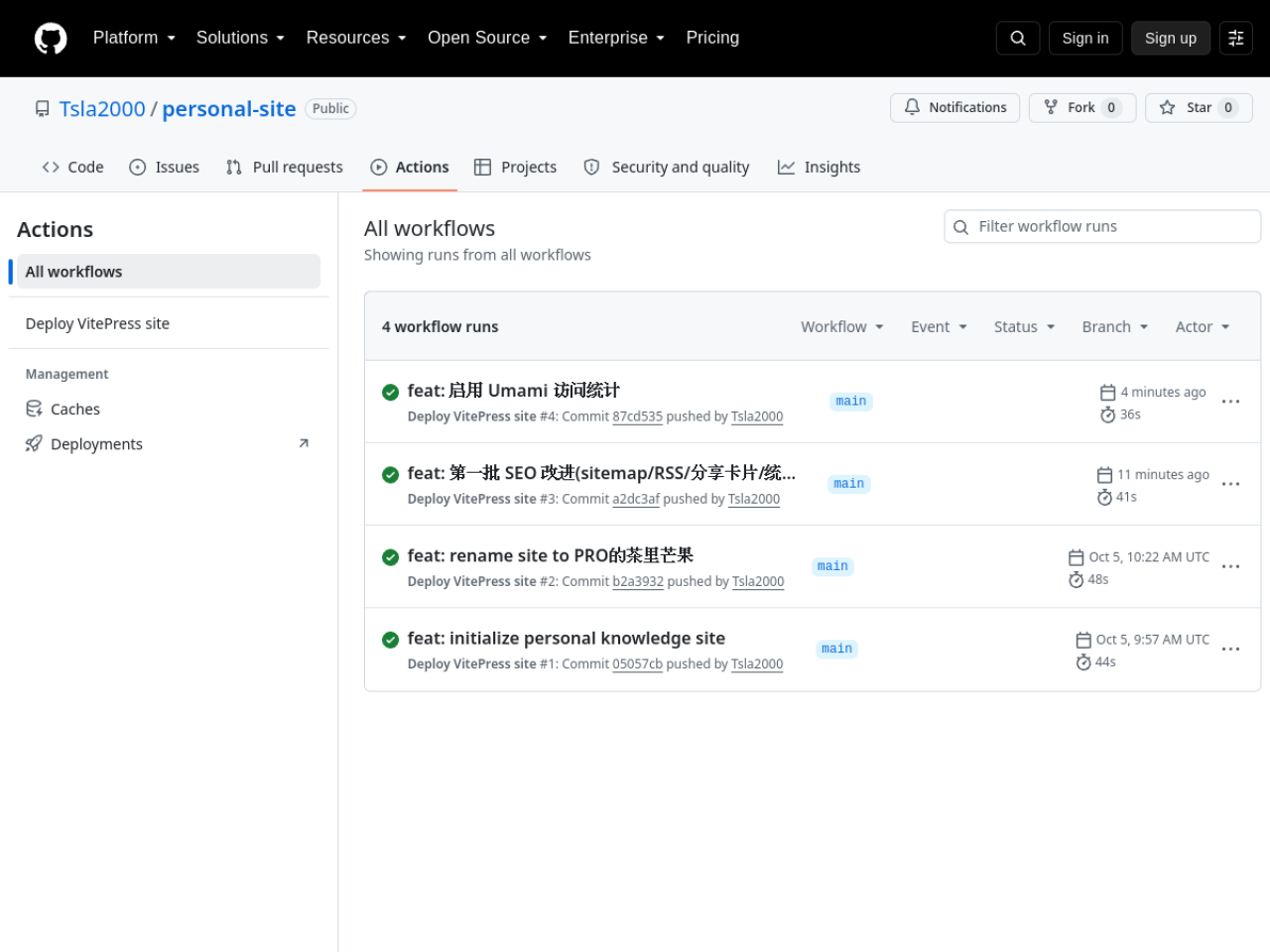
The GitHub Actions pipeline. A push deploys the site. Nobody has to watch the job.
The posts, the config, and the deploy all live in files, so the agent can do most of the work without opening a dashboard.
This pass covered:
- Check the SEO config and fix what was wrong.
- Replace the placeholder domain in the sitemap and the RSS feed.
- Add the social-share tags.
- Generate the RSS feed.
- Add robots.txt and canonical links.
- Leave a clean place to plug in analytics later.
The loop itself is four steps:
- Clone the repo and read the layout and the build config.
- Edit the files and run
npm run docs:build. - When the build passes, commit.
- Let GitHub Actions publish.
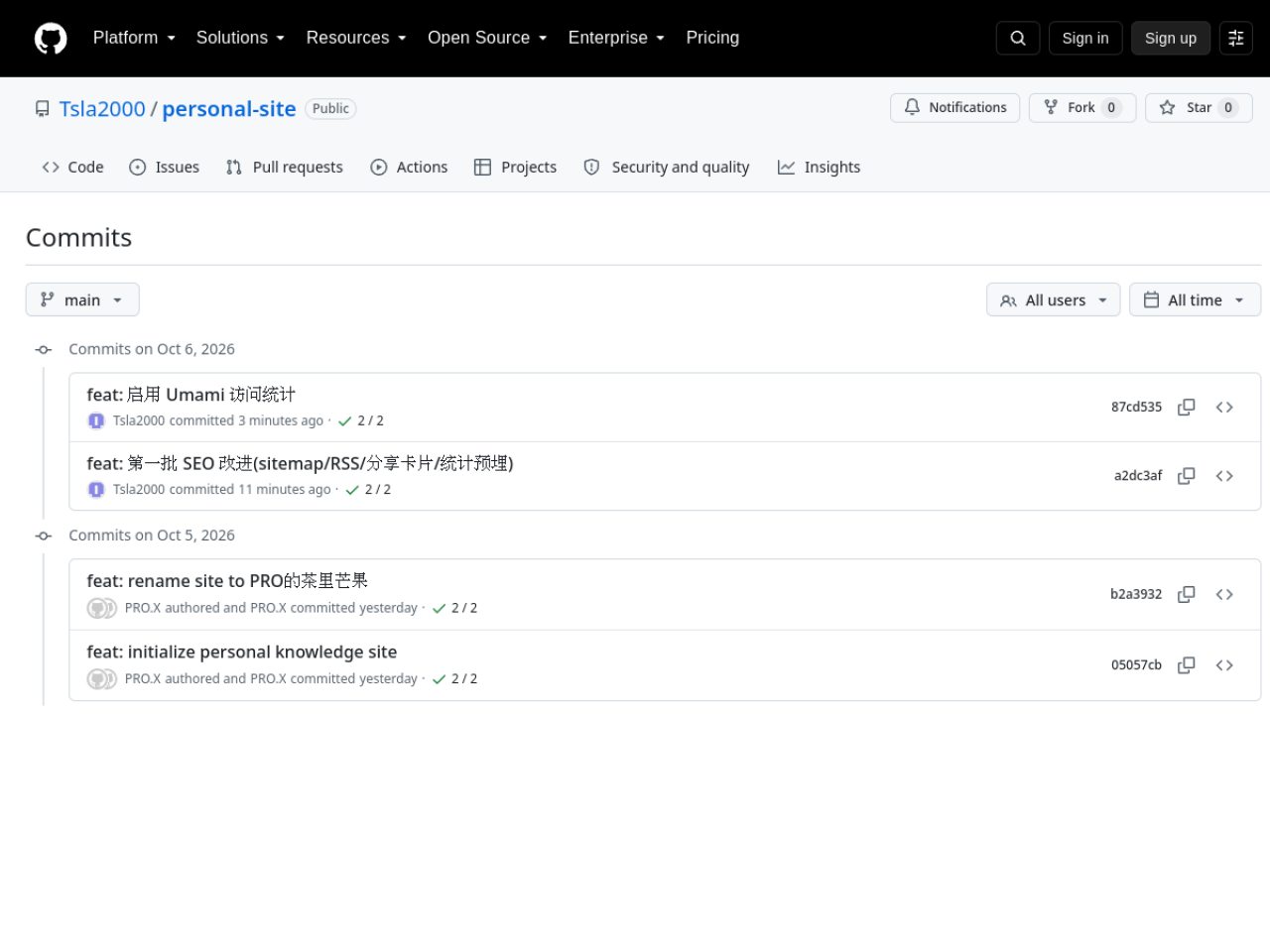
The commit log. Every push starts a deploy. There is no separate release step.
From my side that is a chain of edits, commands, error messages, a commit, and a publish. From the agent's side it is one loop it can run again.
You set the goal. The agent does the work
On this pass I chose the goal, picked the analytics setup, and supplied an account or a credential when the job actually needed one.
Muse read the code, edited the files, ran the build, and committed.
I still checked three things, and the agent's own summary was not the result:
- The diff was the change I asked for.
- The build and the tests passed.
- The live site rendered.
An agent can misread the task, stop halfway, or edit files and never commit them. The more of the loop you hand over, the more the acceptance check matters.
The permission boundary
Signup, identity checks, and some credential creation still need a person.
The sharper question is what the agent is allowed to touch.
A GitHub token with too much scope can damage the whole repository in one bad call. I keep the rules tight:
- Grant only the access this task needs.
- Keep passwords and tokens out of the code and out of ordinary config files.
- Store credentials in a secrets manager.
- Ask for a human confirm before a delete, a permission change, or publishing something sensitive.
- Keep the diff, the build log, and the deploy record, and keep a way to roll back.
Automation takes the repeated work off your plate. The permission boundary keeps one mistake from spreading.
Why this stack is easy to copy
Three pieces:
- VitePress. Markdown for the posts and the config, so Git and an agent can both read and edit them.
- GitHub Actions and GitHub Pages. They build and publish. There is no server to babysit.
- An AI agent. It reads the code, edits files, runs commands, checks the result, and commits.
A personal blog is a good first target. The structure is small, and you decide how often it publishes. A shop, a finance system, or anything that holds private data should not reuse these permissions or this release path.
How far you automate should follow how much damage a mistake can do.
Where the speed comes from
In 2023 GitHub published an experiment: developers using GitHub Copilot finished a specific JavaScript task about 55.8% faster than developers who did not.
That is a real saving on one kind of task. It does not mean every project gets the same lift, and generated code still has to be reviewed.
For an agent, the gain is the joins between steps, not only the lines of code. If the model only writes the code, you still run the tests, read the errors, commit, and publish. When the agent carries that whole chain, and you stop switching tools between each step, the loop gets shorter.
A longer chain can also carry a mistake further. The build, the review, the check on the live site, and the rollback stay in the loop.
What is still worth your time
SEO tags, an RSS feed, and some of the content upkeep fit an agent when the rule is clear and the result can be checked.
Who the site is for, which subjects it takes on, which pieces are worth publishing, and whether the site is doing anything useful: those stay with me.
The execution can be automated. The goal stays mine.
Once an agent can finish a whole loop, the human work is to ask the question, set the rules, limit the permissions, and check the result.
The site deploys on its own now.
The next thing I want to measure is growth. If the agent keeps publishing, reading the numbers, and tuning the site, does that produce a change I can actually count?
Sources: the deploy recorded in the GitHub repository Tsla2000/personal-site; GitHub's 2023 Copilot experiment on a JavaScript task (about 55.8% faster).
This is a personal note, not investment advice.